Recently, I had to review code for undo/redo functionality for a half-edge data structure. This made me reflect on how different programmers approach problem-solving, considering the trade-offs between the development costs and the efficiency of the resulting solution. I would like to discuss all the possible approaches and how they ultimately impact the final solution, its efficiency, and the effort required from the programmer. Let’s explore various approaches.
Prerequisites
Undo/redo pattern
The most common undo/redo pattern works as follows: there are two virtual functions undo and redo. The redo function (sometimes called execute), is triggered when a command (or transaction) is executed. This function performs the operation and saves the object’s state (in this case, the mesh) before the operation (flip) that modifies its state. The undo function restores the mesh’s state to the point before flip was applied.
using TriMeshKernel = OpenMesh::TriMesh_ArrayKernelT<>;

class Flip final : public iUndoRedoTransaction {
public:
	Flip(TriMeshKernel& mesh, OpenMesh::SmartEdgeHandle edgeHandle)
		: mesh(mesh)
		, edgeHandle(edgeHandle)
	{}

	void undo() override {
		// TODO: Implement undo
	}

	void redo() override {
		// TODO: Implement storing the state of the mesh before the flip
		mesh.flip(edgeHandle);
	}
private:
	TriMeshKernel& mesh;
	OpenMesh::SmartEdgeHandle edgeHandle;
	// TODO: Add the state of the mesh before the flip
};
Next, let’s take a closer look at what the flip operation does internally, and then move on to implementing the missing parts in Flip.
Flip operation
In a triangle mesh, an inner edge between two faces has two possible orientations. The function OpenMesh::TriConnectivity::flip(EdgeHandle eh) changes the edge to the other orientation, as shown below:
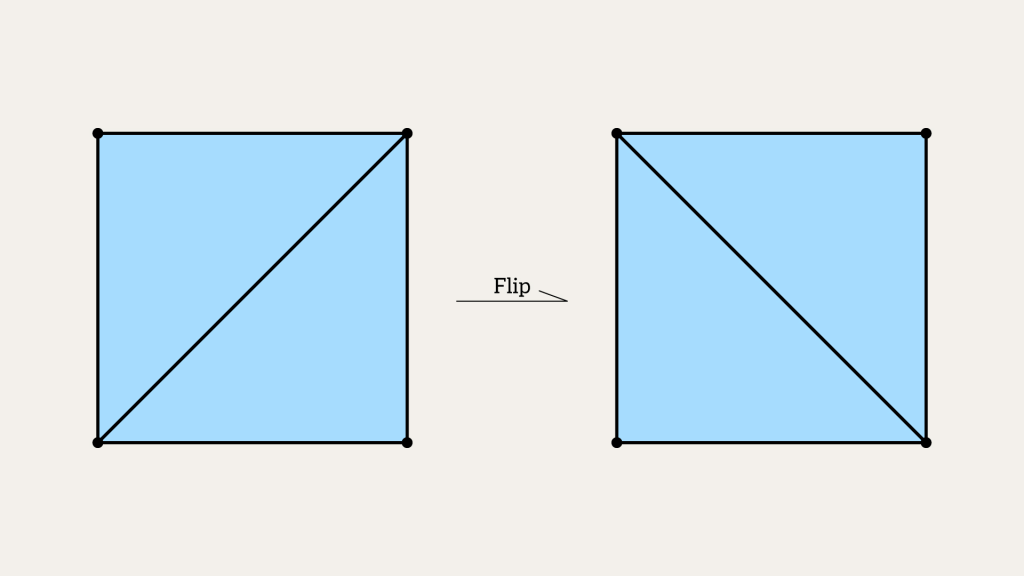
A simple operation, isn’t it? Let’s take a look under the hood:
void TriConnectivity::flip(EdgeHandle _eh) {
	HalfedgeHandle a0 = halfedge_handle(_eh, 0);
	HalfedgeHandle b0 = halfedge_handle(_eh, 1);

	HalfedgeHandle a1 = next_halfedge_handle(a0);
	HalfedgeHandle a2 = next_halfedge_handle(a1);

	HalfedgeHandle b1 = next_halfedge_handle(b0);
	HalfedgeHandle b2 = next_halfedge_handle(b1);

	VertexHandle   va0 = to_vertex_handle(a0);
	VertexHandle   va1 = to_vertex_handle(a1);

	VertexHandle   vb0 = to_vertex_handle(b0);
	VertexHandle   vb1 = to_vertex_handle(b1);

	FaceHandle     fa = face_handle(a0);
	FaceHandle     fb = face_handle(b0);

	set_vertex_handle(a0, va1);
	set_vertex_handle(b0, vb1);

	set_next_halfedge_handle(a0, a2);
	set_next_halfedge_handle(a2, b1);
	set_next_halfedge_handle(b1, a0);

	set_next_halfedge_handle(b0, b2);
	set_next_halfedge_handle(b2, a1);
	set_next_halfedge_handle(a1, b0);

	set_face_handle(a1, fb);
	set_face_handle(b1, fa);

	set_halfedge_handle(fa, a0);
	set_halfedge_handle(fb, b0);

	if (halfedge_handle(va0) == b0)
		set_halfedge_handle(va0, a1);
	if (halfedge_handle(vb0) == a0)
		set_halfedge_handle(vb0, b1);
}
Basically, it reassigns all the necessary next/prev half-edges and other parameters to change the topology of the mesh around the input edge _eh.
The Most Efficient Solution
A highly efficient solution analyzes the operation’s local neighborhood and stores only the data necessary to revert the changes.
The Flip operation modifies:
- Two half-edges by assigning new vertices;
- Six half-edges by assigning new “next” handles;
- Two half-edges with new face handles;
- Two faces with new outgoing half-edges;
- Two vertices with new outgoing half-edges;
To implement undo for Flip, you must record all these modifications by storing the topology (including all 2+6+2+2 and optionally 2 additional features) states before the operation. While efficient, this approach is complex as it requires a detailed analysis of what needs to be stored and demands careful attention to detail. Honestly, I didn’t even attempt to implement it in code because it involves thorough analysis 🙂
Disadvantages
Writing a revert function for Flip alone may take hours.
Advantages
The minimal required data for reverting is saved, optimizing both memory usage and execution time.
The Simplest but Inefficient Solution: Full Mesh Copy
The simplest solution involves copying the entire half-edge data structure before any operation.
class Flip final : public iUndoRedoTransaction {
public:
	Flip(TriMeshKernel& mesh, OpenMesh::SmartEdgeHandle edgeHandle)
		: mesh(mesh)
		, edgeHandle(edgeHandle)
	{}

	void undo() override {
		mesh = meshCopy;
	}

	void redo() override {
		meshCopy = mesh;
		mesh.flip(edgeHandle);
	}
private:
	TriMeshKernel& mesh;
	OpenMesh::SmartEdgeHandle edgeHandle;
	TriMeshKernel meshCopy;
};
Disadvantages:
Copying the entire mesh for a small operation like Flip is computationally expensive. Storing large meshes is very expensive.
Advantages:
This approach is straightforward and bug-free. It works well for small meshes. This approach works similarly to undo/redo in Photoshop – you can revert to any previous state at any time and retrieve a complete snapshot of the state, as we store a full copy.
A Middle-Ground Solution
The previous solutions represent two extremes: efficiency and simplicity. Is it possible to achieve a balance that maximizes both? The middle-ground approach does this by storing a patch of topological data around the affected features, providing a good compromise between simplicity and performance.
Key Idea
Save only a subset of the mesh (let’s call it the Patch) that includes the area around the vertices affected by the operation, along with the number of vertices, edges, and faces in the mesh before the operation. Here’s an example of how the data structure for the patch might look:
struct Patch {
    uint32_t vertexCount;
    uint32_t edgeCount;
    uint32_t faceCount;
    std::vector<Vertex> vertices;
    std::vector<Edge> edges;
    std::vector<Face> faces;
};
Next, we’ll describe the functions that help form such a patch, starting with the simplest one memorizeVertex. The memorizeVertex function gathers all the data from the input vertex vh and stores it in the patch.vertices list, ensuring that the list always holds the most up-to-date version of the vertex.
void memorizeVertex(const TriMeshKernel& meshData, OpenMesh::VertexHandle vh, Patch& patch) {
    auto point = meshData.point(vh);
    auto normal = meshData.normal(vh);
    auto color = meshData.color(vh);

    Vertex vertex{vh, meshData.halfedge_handle(vh), point, normal, color};

    if (auto it = std::ranges::find(patch.vertices, vh, &Vertex::vh); it == std::end(patch.vertices))
        patch.vertices.push_back(vertex);
    else
        *it = vertex;
}
Please note that I am intentionally not providing the exact structure of Vertex, Edge, and Face, as they mirror the corresponding data structures in OpenMesh. For simplicity, I have supplemented them with additional data (such as vertex position, color, and normals), which in OpenMesh are stored as separate vectors.
I also omitted saving the statuses for vertices, edges and faces for code readability, but this is an important aspect. These statuses must also be considered in all memorize functions, especially if you’re not using the mesh.garbage_collection() function.
Similar actions are performed by memorizeEdge and memorizeFace. We simply copy all the necessary information and update the patch.edges and patch.faces vectors.
Now that we have basic functions to save data about vertices, edges, and faces, we can write the memorizePatch function. This function takes a span of vertices as input and performs the following steps for each vertex in the input:
- Saves the state of the vertex itself;
- Saves the state of all edges incident to the vertex;
- For each face incident to the vertex, saves the state of the face, its edges, and its vertices;
So basically, I’m just saying: “Hey, for this vertex, save all the information connected to it.”
void memorizePatch(const TriMeshKernel& meshData, std::span<const OpenMesh::SmartVertexHandle> vertices, Patch& patch) {
	patch.vertexCount = (uint32_t)meshData.n_vertices();
	patch.edgeCount = (uint32_t)meshData.n_edges();
	patch.faceCount = (uint32_t)meshData.n_faces();

	for (auto vh : vertices)
		memorizeVertex(meshData, vh, patch);

	for (auto vh : vertices)
		for (auto eh : vh.edges())
			memorizeEdge(meshData, eh, patch);

	for (auto vh : vertices) {
		for (auto fh : vh.faces()) {
			memorizeFace(meshData, fh, patch);

			for (auto vh : fh.vertices())
				memorizeVertex(meshData, vh, patch);

			for (auto eh : fh.edges())
				memorizeEdge(meshData, eh, patch);
		}
	}
}
This approach, while somewhat straightforward, reliably captures all the necessary data without saving the entire mesh structure, thus reducing redundant copying.
The function that applies the patch to the mesh is fairly simple: it takes all the data from the patch and writes it back to the mesh. The only challenge lies in correctly setting the previous edge. The issue is that when setting the next edge, the function set_next_halfedge_handle implicitly modifies the previous half-edge.
void set_next_halfedge_handle(HalfedgeHandle _heh, HalfedgeHandle _nheh) {
    assert(is_valid_handle(_nheh));
    halfedge(_heh).next_halfedge_handle_ = _nheh;
    set_prev_halfedge_handle(_nheh, _heh);
}
This can become a problem if we simply loop through and set the next half-edges. As a result, the half-edge structure after applying the patch might differ from what it was before the operation. To avoid this, we need to set the previous half-edges in a separate loop at the very end.
Applying a Patch
void apply(TriMeshKernel& meshData, const Patch& patch) {
	assert(OpenMesh::Utils::MeshCheckerT<TriMeshKernel>(meshData).check());

	meshData.resize(patch.vertexCount, patch.edgeCount, patch.faceCount);

	for (auto [vh, heh, pos, normal] : patch.vertices) {
		meshData.set_halfedge_handle(vh, heh);
		meshData.point(vh) = pos;
		meshData.set_normal(vh, normal);
		meshData.set_color(vh, color);
	}

	for (auto [fh, heh, normal, color] : patch.faces) {
		meshData.set_halfedge_handle(fh, heh);
		meshData.set_normal(fh, normal);
		meshData.set_color(fh, color);
	}

	for (auto [eh, heh0_value, heh1_value, color] : patch.edges) {
		auto heh0 = meshData.halfedge_handle(eh, 0);
		auto heh1 = meshData.halfedge_handle(eh, 1);

		meshData.set_face_handle(heh0, heh0_value.fh);
		meshData.set_vertex_handle(heh0, heh0_value.vh);
		meshData.set_next_halfedge_handle(heh0, heh0_value.next);
		//meshData.set_prev_halfedge_handle(heh0, heh0_value.prev);

		meshData.set_face_handle(heh1, heh1_value.fh);
		meshData.set_vertex_handle(heh1, heh1_value.vh);
		meshData.set_next_halfedge_handle(heh1, heh1_value.next);
		//meshData.set_prev_halfedge_handle(heh1, heh1_value.prev);

		meshData.set_color(eh, color);
	}

	for (auto [eh, heh0_value, heh1_value, color] : patch.edges) {
		auto heh0 = meshData.halfedge_handle(eh, 0);
		auto heh1 = meshData.halfedge_handle(eh, 1);

		meshData.set_prev_halfedge_handle(heh0, heh0_value.prev);
		meshData.set_prev_halfedge_handle(heh1, heh1_value.prev);
	}

    assert(OpenMesh::Utils::MeshCheckerT<TriMeshKernel>(meshData).check());
}
Thus, the Flip command now looks like this:
class Flip final : public iUndoRedoTransaction {
public:
	Flip(TriMeshKernel& mesh, OpenMesh::SmartEdgeHandle edgeHandle)
		: mesh(mesh)
		, edgeHandle(edgeHandle)
	{}

	void undo() override {
		apply(mesh, patch);
	}

	void redo() override {
		OpenMesh::SmartVertexHandle vertices[2]{ edgeHandle.v0(), edgeHandle.v1() };
		memorizePatch(mesh, vertices, patch);
		mesh.flip(edgeHandle);
	}
private:
	TriMeshKernel& mesh;
	OpenMesh::SmartEdgeHandle edgeHandle;
	Patch patch;
};
The main change is that we now store a patch, and in the undo operation, we simply apply this patch. What does this give us? Let’s describe the operation of splitting an edge in half. I don’t know how this function is implemented in OpenMesh, but to implement undo, I don’t need to know (well, to some extent I do, but my intuition tells me it shouldn’t affect other features). It’s enough to take the edge to be split, capture its vertices, and memorize everything in their neighborhood.
class SplitEdge final : public iUndoRedoTransaction {
public:
	SplitEdge(TriMeshKernel& mesh, OpenMesh::SmartEdgeHandle eh, OpenMesh::Vec3d pos)
		: mesh(mesh)
		, eh(eh)
		, pos(pos)
	{}

	void undo() override {
        apply(mesh, patch);
	}

	void redo() override {
		OpenMesh::SmartVertexHandle vertices[2] = { edgeHandle.v0(), edgeHandle.v1() };
		memorizePatch(mesh, vertices, patch);
        OpenMesh::SmartVertexHandle newVh = mesh.add_vertex(pos);
        mesh.split(edgeHandle, newVh);
	}
private:
	TriMeshKernel& mesh;
	OpenMesh::SmartEdgeHandle edgeHandle;
	OpenMesh::Vec3d pos;
	Patch patch;
};
The SplitFace operation is similar, but now we pass three vertices to memorizePatch.
Adding faces
The redo operation for AddFace is also implemented using memorizePatch:
OpenMesh::SmartVertexHandle vertices[3] = { v0, v1, v2 };
memorizePatch(mesh, vertices);
mesh.add_face(v0, v1, v2);
The idea is that when add_face is called, new handles (vertices, edges, faces) are added to the end of the corresponding vectors. Thus, the undo operation consists of resizing the vectors back to their sizes before the new features were added. However, the idea of using patches will only work here if you do not call garbage_collection on the mesh. This function removes all marked handles and reindexes all feature vectors.
Filling Holes
To create a patch for a more complex operation like FillHole, you simply need to pass the vertices that form the holes to memorizePatch. This is because, essentially, filling a hole is similar to adding a set of faces that close the hole.
Removing Faces
Deleting a face looks almost identical to the operation of adding a face.
The key point is that OpenMesh does not actually delete features but simply marks them as deleted. Therefore, in the patch, you need to save the status of each feature before applying the operation. It is also worth noting that, as with add_face, if garbage_collection is called, the idea of using patches will not work, as garbage_collection physically removes all features marked as deleted.
OpenMesh::SmartVertexHandle vertices[3] = { face_v0, face_v1, face_v2 };
memorizePatch(mesh, vertices);
mesh.delete_face(face);
Collapse
The only “tricky” operation turned out to be Collapse. It affects not just the neighborhoods of two vertices but also the neighboring vertices of the original vertices. The simplest and most reliable solution I came up with is to take all the neighboring vertices of the original vertices and pass them to memorizePatch.
std::vector<OpenMesh::VertexHandle> vertices;
vertices.push_back(vh0);
vertices.push_back(vh1);

for (auto vh : std::views::concat(vh0.vertices(), vh1.vertices()))
	if (!std::ranges::contains(vertices, vh))
		vertices.push_back(vh);

memorizePatch(mesh, vertices, patch);

auto heh = meshData.find_halfedge(vh0, vh1);
meshData.collapse(heh);
Conclusion
In summary, the goal of this post was not to provide a step-by-step guide on implementing undo/redo for a half-edge structure but to demonstrate how to quickly create a solution that is both relatively efficient and simple, avoiding the need to meticulously design undo logic for every individual operation.
P.S.
The undo operation for a flip, which might look identical to the redo, generally doesn’t work. It’s logical to assume that the reverse operation for a flip should be the flip itself since the operation is symmetric. However, this idea fails because, during the incremental application of patches, the direct use of flip in undo can create connections to other half-edges. These connections may then affect subsequent data dependencies in the transaction stack.
P.P.S.
And as always, to avoid dynamic memory allocation, you can use pmr within Patch. This is covered in the post: https://alexsyniakov.com/2024/05/03/mesh-clipping-operations-with-openmesh-library/


 Alex on software development
Leave a comment